⚡ BILLING, STOCK & BOOKS

GST Billing. Simplified.
Your Business, Connected.

Create invoices, manage purchases and stock, and keep your books connected. Choose Cloud, Offline Desktop or LAN to suit the way your business works.

GST Billing Pro • Sample workspace
● Illustrative Preview

Invoice INV/2627/001

Illustrative Invoice • Sample Tax Assumptions

✓ SAMPLE
Sample Kavya Stores
Masked sample
23 Oct 2026
Gujarat (Intrastate)
Item Description HSN/SAC Qty Rate (₹) Taxable (₹) GST Rate Total (₹)
Sample stationery item A
Illustrative quantity and rate
Sample 50 Nos ₹100.00 ₹5,000.00 18% (9+9) ₹5,900.00
Sample stationery item B (Pack of 10)
Illustrative tax rate
Sample 20 Pkt ₹60.00 ₹1,200.00 18% (9+9) ₹1,416.00

UPI Payment Option

Confirm UPI receipts before recording.
Illustrative QR, not a payment request.

Taxable Amount ₹6,200.00
CGST (9%) ₹558.00
SGST (9%) ₹558.00
Grand Total ₹7,316.00

80mm & 58mm Receipt Formats

Choose a compact receipt layout. Validate printing, transport and cutter behaviour for your exact device.

SAMPLE TRADING
Illustrative receipt • Cash
Notebooks (x2) ₹200.00
Ball Pens (x5) ₹150.00
GST Included (18%) ₹53.39
TOTAL ₹350.00
Offline Desktop & LAN Counters

Bill locally on Desktop, or connect counters to a shared LAN hub. Cloud needs a server connection for posting.

HUB
PC 1
PC 2
POS
TAB

Barcode Entry at the Counter

Use supported scanners for item entry. Scanner, printer and cash drawer compatibility need device validation.

POS
Barcode Item Entry

From the counter to the books, connected

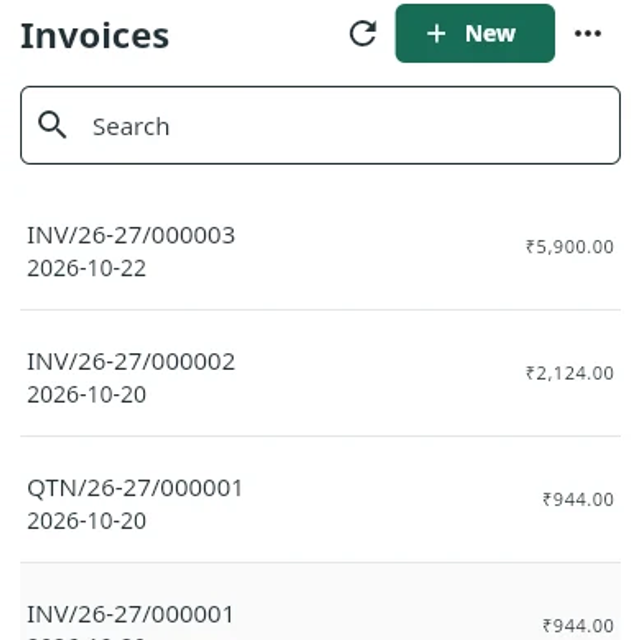
Follow sales, purchases and stock through to shared records and GST review. The product captures below use synthetic sample data.

Keep every sale connected to its payment

Create invoices, record receipts and follow the remaining balance. Review the original sale before a correction, with actions governed by the rights assigned to your team.

  • ✓ Record cash without an online payment provider
  • ✓ Follow receipts, balances and linked corrections
  • ✓ Choose A4, A5, A6, 80mm or 58mm documents
Explore Product Details →
Actual GST Billing Pro detail with synthetic sample records. Technical record references retain their original format.

Choose the right paper for the sale

A4, A5, A6, 80mm and 58mm document layouts cover detailed invoices and compact receipts. Check the full sample and your printer before choosing.

Detailed Documents

A4 Full Page

Full page documents for detailed item lists, business details and invoice terms.

Compact Paper Options

A5 & A6 Compact

Two smaller paper sizes for everyday bills. Review every page of the sample.

Counter Receipts

80mm Thermal (3")

A wider thermal receipt layout. Check the exact printer, transport and cutter.

Smaller Receipts

58mm Thermal (2")

A narrow receipt layout for supported compact printers. Device validation applies.

One business. A setup that fits your shop.

Choose where your records live and understand the connection each setup needs. Cloud, Offline Desktop and LAN are separate operating modes.

Offline Desktop

Local billing with SQLite records on your own machine. Online services still need connectivity.

  • ✓ Local billing without internet
  • ✓ Records on your machine
  • ✓ Managed backups and restore checks
  • ✓ Accepted platform and installer needed
Explore Desktop Setup

Cloud Workspace

Central company records in the browser and supported clients. Financial posting needs a server connection.

  • ✓ Branches within one GST registration
  • ✓ Company memberships and roles
  • ✓ Scoped customer and supplier portals
  • ✓ Database and attachment recovery controls
Discuss Cloud Setup

Choose the right fit for your business

Compare setups below, then confirm your plan and capacity. Ask us for the current offer, with prices quoted in ₹.

Offline Desktop
For businesses choosing local records and an accepted desktop installation.
Ask us for a quote
  • ✓ Local billing workflow
  • ✓ Cash receipt recording
  • ✓ Supported document layouts
  • ✓ Installation and license journey
  • ✓ Backup responsibilities explained
Review Current Offers
LAN Counters
For shared counters working through a hub on your local network.
Ask us for a quote
  • ✓ A shared hub and counter setup
  • ✓ Staff authentication and cashier rights
  • ✓ Hub owned company records
  • ✓ Device and capacity review
  • ✓ Hub backup and availability planning
Discuss Your Counters

Frequently Asked Questions

What happens when the internet goes down? +
It depends on your setup. Offline Desktop supports local billing. LAN counters must reach their shared hub. Cloud needs a server connection for financial posting, and online services require internet. Cash receipts do not need an online payment provider.
How do several counters share business records? +
LAN counters use a shared hub rather than separate copies of the business database. Staff sign in with assigned rights, and the hub controls invoice numbering. Cloud uses central company records. Supported capacity and installation requirements must be reviewed for your chosen setup.
Which paper sizes and printers can I use? +
Document layouts include A4, A5, A6, 80mm and 58mm. Compatibility depends on your exact printer, operating system and connection. Review sample output and validate printing, cutters and any cash drawer before relying on a device at the counter.
How does GST filing handoff work with my accountant? +
Review source records, GST components and supported export formats for the applicable return. You or your accountant complete filing separately on the GST portal. Review worksheets are not always portal upload files. Government invoice and eway bill services need separate approved provider setup.

Find the right setup for your business.

Tell us about your counters, locations and everyday work. Explore the product, review approved plans and check available releases before choosing.